🔑 Settings & API Connection
Everything in One Place
The Settings tab is the control center of TradeMetrics. Here you can manage your license, connect to exchanges via API, control the trades cache, set the history period, and configure your initial balance for accurate percentage metrics.
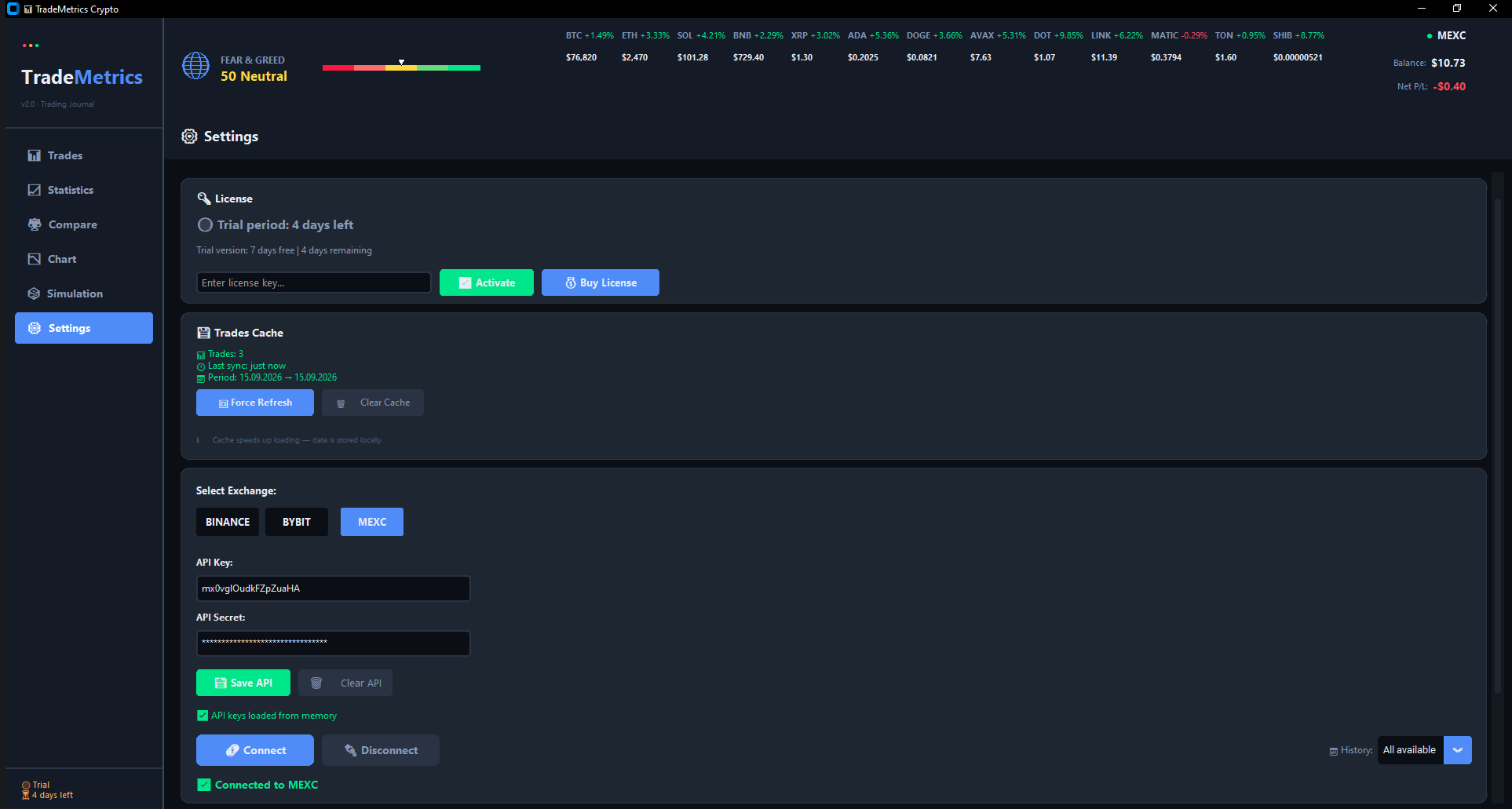
Settings tab — license, exchange connection, cache, and account configuration
🔑 License
At the top of the Settings tab you'll find the License block:
- 🟡 Trial period — shows remaining days of the 7-day free trial
- 🟢 Active license — shows the license key and expiration date
- 🔴 Expired / Not found — prompt to activate a new license
You can:
- 📥 Enter a license key and click "Activate"
- 💰 Click "Buy License" — opens the purchase page in your browser
Licenses are activated through our server and bound to your machine ID for maximum security.
🌐 Select Exchange
TradeMetrics supports connecting to 3 major crypto exchanges via API. Switch between them with a single click:
🔐 API Keys
Enter your API Key and API Secret, then click "Save API" to store them locally. On the next launch, TradeMetrics will automatically load the saved keys.
- 💾 Save API — stores keys in a local config file
- 🗑️ Clear API — removes saved keys
🔒 Security note: Always use Read-Only API keys! TradeMetrics only needs permission to fetch your trade history and balance — it never trades on your behalf.
🔗 Connection
After saving API keys, click "Connect" to establish a session with the exchange. The status indicator will show:
- 🔴 Disconnected — not connected
- 🟢 Connected to [Exchange] — session is active
Once connected, all your trades are automatically loaded into the Trades tab.
💾 Trades Cache
TradeMetrics uses a local SQLite cache to store your trades. This makes loading instant — even with thousands of trades.
Without cache: 5–30 seconds depending on history size.

Trades Cache block — cache info, Force Refresh, and Clear Cache buttons
📅 History Period
Choose how far back TradeMetrics loads your trades. Use the "History" dropdown in the Connection block:
- 30 days — last month only
- 90 days — last quarter (default)
- 180 days — last half-year
- 365 days — full year
- All available — maximum history offered by the exchange
The setting is saved to config.json and applied on every launch.
💰 Initial Balance
Specify the initial balance of your trading account. This is used for all percentage metrics — like Profit % in the Trades table or Total Return on the Chart tab.
- 💾 Save — stores balance for the current account
- 🗑️ Clear — removes the saved balance
How to Get API Keys
- Binance: Account → API Management → Create API (enable "Read-Only")
- Bybit: Account → API Management → Create New Key (enable "Read-Only")
- MEXC: Account → API Management → Create API (enable "Read-Only")
⚠️ After creating the key, copy the API Key and API Secret into the corresponding fields in TradeMetrics.
Benefits of API Connection
- ⚡ Automatic loading of all trades
- 🔄 Real-time up-to-date data
- 🔒 Secure local storage of API keys
- 📊 Complete trading history
- 💰 Automatic balance calculation
- 💾 Instant loading thanks to the trades cache
🔒 TradeMetrics — Professional Trading Journal